 Clear Cortex
Meta ads safe zones: Reels, Stories and Feed on Facebook and Instagram
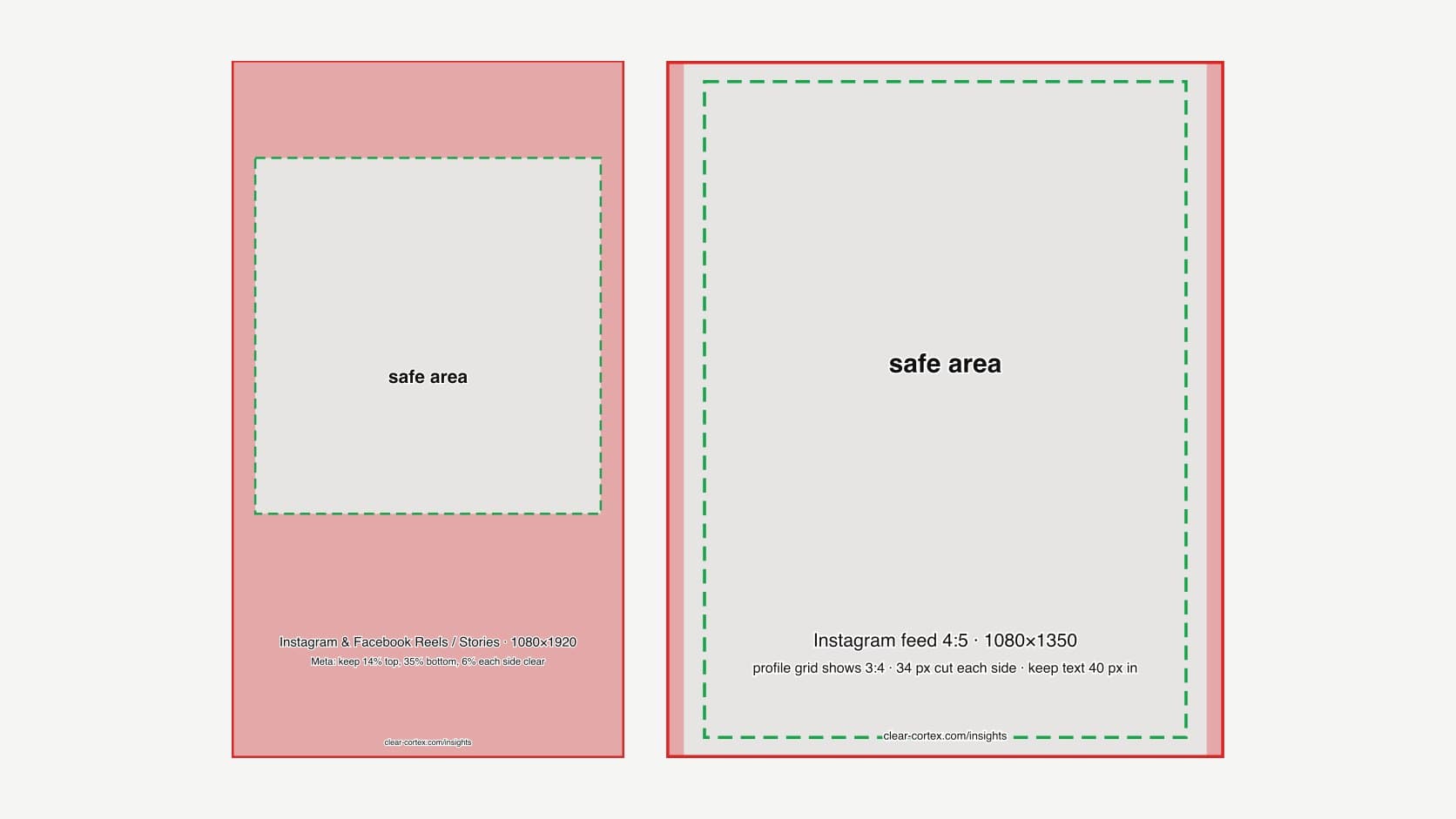
Meta's safe zone is the part of an ad that the Facebook and Instagram interface does not cover: the profile icon and name at the top, and the caption, the "Ad" label and the call-to-action button at the bottom. Meta gives it as percentages, and it is the same on both apps.
this page turns those percentages into pixels and covers which placements they apply to (including Facebook Reels, which Meta's Ads Guide has no page for). Instagram's organic grid and feed crops are in Instagram safe zones, and every Meta ad size is in Meta ad specs. checked November 2026.
the short answer
for any 9:16 ad on Facebook or Instagram (Reels, Stories, and 9:16 in Feed), Meta asks you to leave at least 14% of the top, 35% of the bottom and 6% on each side free of text, logos and other key elements. in pixels:
| keep clear | share | at 1080×1920 | at 1440×2560 (Meta's recommended size) |
|---|---|---|---|
| top | 14% | 269 px | 358 px |
| bottom | 35% | 672 px | 896 px |
| each side | 6% | 65 px | 86 px |
| safe area | 88% × 51% | 950 × 979 px | 1,268 × 1,306 px |
if a Reels ad carries a disclaimer, the bottom band grows to 40%, 768 px at 1080×1920.
which placements it covers
Meta's help page on text overlays sets one rule for 9:16 ads "in Stories, Reels, Feed and Facebook in-stream reels": keep the top, bottom and sides clear. the Ads Guide's Instagram Reels, Instagram Stories and Facebook Stories pages each give the same 14 / 35 / 6. so for a vertical ad there is one number set, whichever app and placement it lands in.
- Instagram Reels and Stories: 14 / 35 / 6, printed on their Ads Guide pages.
- Facebook Stories: 14 / 35 / 6, printed on its Ads Guide pages.
- Facebook Reels: Meta's Ads Guide has no working Facebook Reels page (it returns a not-found error). the help page puts Reels under the same 9:16 rule, so 14 / 35 / 6 is the figure to use, and it is the one Meta's own overlay applies.
- 9:16 video in Instagram Feed: Meta says it uses the same guidance as Reels and Stories.
feed ads in 4:5 and 1:1
for Instagram Feed ads that are not 9:16, Meta's guidance is to keep the bottom and side edges free of key elements. it does not give a percentage. the Facebook and Instagram Feed image pages recommend 4:5 at 1440×1800 and print no safe-zone figure at all.
a sensible margin, ours rather than Meta's: keep text and logos at least 40 px in from every edge on a 1080×1350 frame, with a little more at the bottom, which is the edge Meta names.
the feed crop is where people get caught. the complaint from ad accounts is a familiar one:
"meta cropped your image to a square and cut off the product"
taller phones and the crop
on screens taller than 9:16, Meta says it may either zoom the creative to fill the screen, which crops whatever sits outside the safe zone, or show it at 9:16 on a black background. you do not get to choose which. both are harmless if the important parts are inside the zone, and the first is the reason to treat the margins as a minimum.
the safe zone guardrail in Ads Manager
Ads Manager can draw the zone for you. switch on the Safe Zone guardrail when you build the ad and a yellow overlay appears on the creative; the area inside it is safe. it is the last check before publishing. the safe zone checker is the check to run earlier, while the design can still change cheaply.
Need the post, not just the size?
Make it at 1080×1920 in Clear Cortex, with the ratio already set.
against TikTok and Shorts
Meta's zone is the most generous on the sides (65 px against TikTok's 120 and YouTube's 192 on the right) and close to the others at the top and bottom. a layout that only respects Meta's margins can lose its right edge on the other two. the box clear on all three is x 120–780, y 288–1,248 at 1080×1920; it is explained in TikTok safe zones and YouTube Shorts safe zones.
the summary
- 14% top, 35% bottom, 6% each side for every 9:16 ad on Facebook and Instagram: 269 / 672 / 65 px at 1080×1920.
- Facebook Reels uses the same zone. Meta has no separate figure for it.
- with a disclaimer, keep the bottom 40% clear.
- 4:5 and 1:1 feed ads: Meta says keep the bottom and sides clear, without a number.
- taller phones may zoom and crop. the zone is a minimum, not a target.
every platform's sizes are in the social media specs hub.