 Clear Cortex
YouTube Shorts safe zones: where captions, logos and CTAs go, in pixels
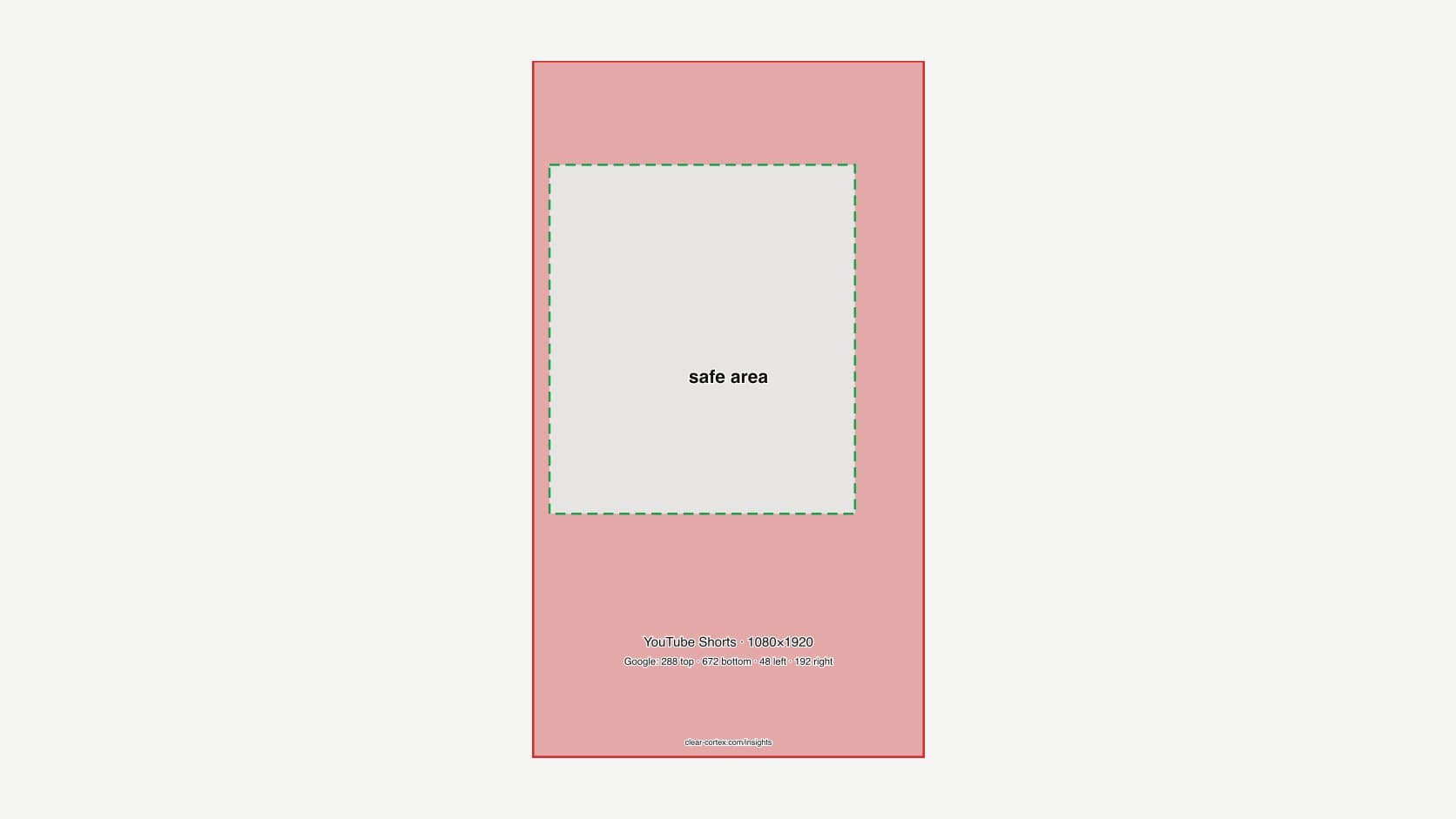
the YouTube Shorts safe zone is the part of a 9:16 frame that the Shorts player does not cover: search and the status bar across the top, the like, comment, share and remix buttons down the right, and the title, channel name, sound and any call to action stacked along the bottom.
Google publishes one diagram for it, in its ads help, drawn on a 1080×1920 frame. this page gives those numbers and shows where each part of a Short belongs inside them. sizes and length are in YouTube Shorts size. checked November 2026.
the short answer
on a 1080×1920 Short, keep text, logos and products out of:
- top: 288 px (15%), search, the camera icon and the status bar.
- bottom: 672 px (35%), the title, channel name, sound line and, on ads, the call-to-action button.
- right: 192 px (18%), the column of buttons.
- left: 48 px (4%), the device edge.
that leaves an 840×960 px box, from 48 to 888 px across and 288 to 1,248 px down. Google asks advertisers to keep logos, products and text inside it "to avoid risk of elements being covered".
Need the video, not just the size?
Make it at 1080×1920 in Clear Cortex, with the ratio already set.
where each element goes
the box is not one undivided space. what you put in it, and where, decides whether the Short reads with the interface on top of it:
- headline or hook text: just under the 288 px line. it is the first thing read, and the top of the box is the part least likely to collide with anything.
- the product or the face: the middle of the box. it is the area every platform agrees is clear.
- burned-in captions: at the bottom of the box, above 1,248 px, not in the traditional subtitle position at the very bottom of the frame. down there they sit behind the Short's own title and channel name.
- price, offer or logo: centred or left-aligned. the lower-right corner, where brand guidelines usually put a logo, is under the buttons.
captions matter more than anything else on the list, because most people watch with the sound off. one practitioner's workflow puts it simply:
"Captions. Most people watch on mute, so captions are part of the ad, not an extra. Keep them in the safe zone, middle third, away from the edges."
the right-hand column
192 px is the margin that catches people out. Meta asks for 65 px each side on Reels and TikTok's standard file asks for 120 px, widening to 300 px only lower down. a headline right-aligned for Reels loses its last word on Shorts, and a logo tucked into the corner disappears under the share button.
the simple habit is to centre text horizontally inside the box, not the frame. the centre of the box is 468 px across, not 540.
organic Shorts against ads
Google's diagram is for vertical video ads. YouTube does not publish a separate safe zone for organic Shorts. the organic player has the same top bar, the same right-hand column and the same title and channel stack at the bottom, without the ad's call-to-action button, so the ad numbers are slightly conservative for organic posts.
design to them anyway. a Short that does well organically is the one most likely to be put behind spend later, and laid out to the ad zone it needs no re-edit. Google also says overlays, calls to action and buttons can sit differently depending on the format, the campaign type and the screen, which is a reason to keep a margin, not shave one.
one edit for Shorts, Reels and TikTok
all three cover the same places in different amounts. on 1080×1920:
| keep clear | YouTube Shorts | Instagram / Facebook Reels | TikTok In-Feed |
|---|---|---|---|
| top | 288 px | 269 px (14%) | 240 px |
| bottom | 672 px | 672 px (35%) | 660 px |
| left | 48 px | 65 px (6%) | 120 px |
| right | 192 px | 65 px (6%) | 120 px, 300 px from 840 down |
the box clear on all three is x 120–888 down to 840 px, then x 120–780 to 1,248 px. as one rectangle: x 120–780, y 288–1,248. the overlaid diagram is in the TikTok safe zones guide and Meta's side is in Meta ads safe zones.
check before you export
the quickest check is to drop a frame into the safe zone checker and switch between Shorts, Reels and TikTok to see all three on your own design.
the summary
- 288 top, 672 bottom, 48 left, 192 right on 1080×1920. from Google's own diagram.
- the safe box is 840×960, centred at 468 px across. centre text in the box, not the frame.
- captions go above 1,248 px, not at the bottom of the frame.
- no official organic zone. design organic Shorts to the ad zone so they can be boosted unchanged.
- x 120–780, y 288–1,248 clears Shorts, Reels and TikTok.
every platform's sizes are in the social media specs hub.